

Hi
I started making instructions for my Lego MOCs, so I also started playing with rendering Lego models. I use for this Studio program. It’s great, even though he has a lot (a lot ^ 3) of small bugs (and not small too).
I didn’t like transparent color rendering, so I played a bit with this aspect. It’s totally hacking method. I modified exported results from Blender, the file:
Studio 2.0 \ PhotoRealisticRenderer \ win \ 64 \ settings.xmlThis file contains all parameters for materials used for rendering. Studio photo realistic renderer is based on Cycles from Blender. See this blogpost by Dave Schefcik for more info:
Hacking Studio: How To Get Better Renders Like Blender
I didn’t know this before doing the experiments, but I wanted to find some editor for materials and that’s how I came across mentioned blogpost.
I was interested in classic colors (transparent yellow, red, green, dark blue), for classic space MOCs obviously.
The default render looks like this:
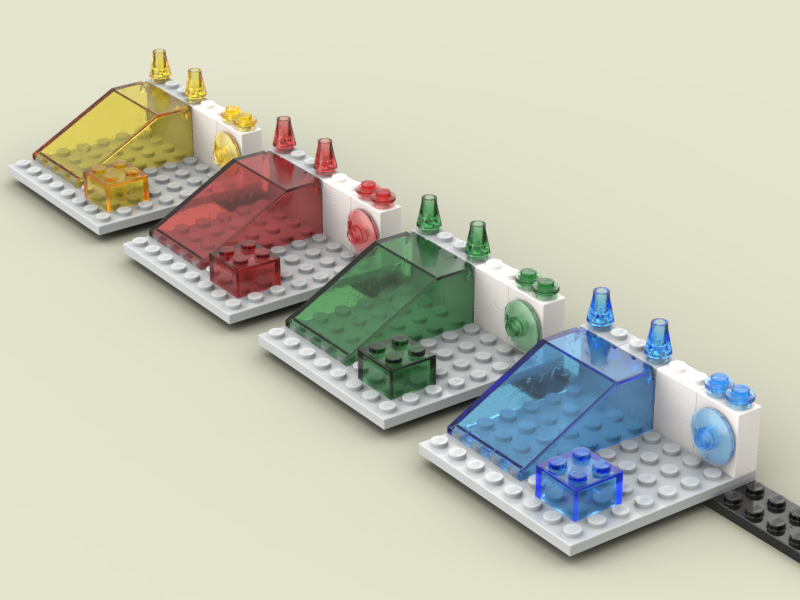
After my experiments, looks like this:

I found that all these transparent materials are derived from a single one, and only a color property is overriden, all other parameters are the same (in general). There are many parameters, and what looks good on transparent yellow, doesn’t look so good on, for example, transparent red.
I didn’t manage to override only interested parameters (it’s possible, but after a few tries I droppped this). Instead I copied whole parent material, changed its name, and made the newly created material a parent material for a specific transparent color. I made this for all three colors: red, green and dark-blue. So I added three unnecessary whole materials (named groups in this nomenclature I think) instead of overriding only single properties. It should be doable in Cycles editor in Blender (but I don’t know Cycles, and only a very little Blender).
Here is original settings.xml file from Studio ver 2.24.4 (4):
Download original settings.xml
And here is the modified settings.xml file (which is used to render the second image):
Download modified settings.xml
If You want to experiment, don’t forget to make a copy of this file locally on Your computer.
So, when You open this file You will found materials for these three colors, named:
TRANS-RED
TRANS-GREEN
TRANS-DARK_BLUE
I will show modifications only for red color, for other two modifications are similar (but with different values of some properties).
Here is TRANS-RED material after modifications, I changed
TRANS-GROUP_BASEto
TRANS-GROUP_BASE_REDeverywhere in the original material:
<material displacement_method="bump" heterogeneous_volume="False" name="TRANS-RED" use_local_tuning="False" use_mis="True" use_transparent_shadow="True" volume_interpolation_method="linear" volume_sampling_method="multiple_importance">
  <shader>
    <color name="RGB_White" value="1.0 1.0 1.0" />
    <color name="RGB" value="0.88 0 0" />
    <group group_name="TRANS-GROUP_BASE_RED" name="TRANS-GROUP_BASE_RED">
      <input name="WhiteColor" type="color" />
      <input name="Color" type="color" />
      <output name="Shader" type="closure" />
      <output name="Volume" type="closure" />
      <output name="Normal" type="vector" />
    </group>
    <connect from_node="TRANS-GROUP_BASE_RED" from_socket="Shader" to_node="Output" to_socket="Surface" />
    <connect from_node="RGB" from_socket="Color" to_node="TRANS-GROUP_BASE_RED" to_socket="Color" />
    <connect from_node="TRANS-GROUP_BASE_RED" from_socket="Volume" to_node="Output" to_socket="Volume" />
    <connect from_node="RGB_White" from_socket="Color" to_node="TRANS-GROUP_BASE_RED" to_socket="WhiteColor" />
  </shader>
</material>
And I copied, just before this material in the xml file, source TRANS-GROUP_BASE and changed its name into TRANS-GROUP_BASE_RED, the whole section with TRANS-RED material:
<group name="TRANS-GROUP_BASE_RED">
    <shader>
      <absorption_volume name="TransGroupBaseVolumeAbsorption">
        <input name="Density" type="float" value="8.000000" />
      </absorption_volume>
      <group group_name="NormalGroup" name="TransGroupBaseNormalGroup">
        <output name="Normal" type="vector" />
      </group>
      <value name="MinRoughness" value="0.05000000074505806" />
      <value name="MaxRoughness" value="0.5" />
      <vector_transform convert_from="object" convert_to="world" name="TransGroupBaseVectorTransform" type="point" />
      <texture_coordinate name="TransGroupBaseTextureCoordinate" />
      <group_input name="GroupInput" />
      <group group_name="UVGroup" name="TransGroupBaseUVGroup">
        <input name="InColor" type="color" />
        <input name="WorldPos" type="vector" />
        <input name="MinRoughness" type="float" />
        <input name="MaxRoughness" type="float" />
        <output name="OutColor" type="color" />
        <output name="OutRoughness" type="float" />
      </group>
      <group group_name="ScratchGroup" name="TransGroupBaseScratchGroup">
        <input name="WorldPos" type="vector" />
        <input name="Normal" type="vector" />
        <input name="Distance" type="float" value="0.050000" />
        <output name="Normal" type="vector" />
        <output name="DirtStrength" type="float" />
        <output name="DirtBSDF" type="closure" />
      </group>
      <principled_bsdf distribution="ggx" name="TransGroupBasePrincipledBSDF" subsurface_method="burley">
        <input name="Subsurface" type="float" value="0.5" />
        <input name="SubsurfaceRadius" type="vector" value="0.10000000149011612 0.10000000149011612 0.10000000149011612" />
        <input name="SubsurfaceColor" type="color" value="0.88 0.0 0.0" />
        <input name="Metallic" type="float" value="0.000000" />
        <input name="Specular" type="float" value="0.500000" />
        <input name="SpecularTint" type="float" value="0.000000" />
        <input name="Anisotropic" type="float" value="0.000000" />
        <input name="AnisotropicRotation" type="float" value="0.000000" />
        <input name="Sheen" type="float" value="0.000000" />
        <input name="SheenTint" type="float" value="0.000000" />
        <input name="Clearcoat" type="float" value="0.000000" />
        <input name="ClearcoatRoughness" type="float" value="0.000000" />
        <input name="IOR" type="float" value="1.490000" />
        <input name="Transmission" type="float" value="1.0" />
        <input name="TransmissionRoughness" type="float" value="0.000000" />
        <input name="ClearcoatNormal" type="vector" value="0.0 0.0 0.0" />
        <input name="Tangent" type="vector" value="0.0 0.0 0.0" />
      </principled_bsdf>
      <group group_name="DirtOnScratchMixGroup" name="TransGroupBaseDirtOnScratchMixGroup">
        <input name="Fac" type="float" />
        <input name="Shader" type="closure" />
        <input name="DirtShader" type="closure" />
        <input name="Vector" type="vector" />
        <output name="Shader" type="closure" />
      </group>
      <group_output name="GroupOutput" />
      <group group_name="STICKER-GROUP" name="Group">
        <input name="Shader" type="closure" />
        <output name="Shader" type="closure" />
      </group>
      <connect from_node="TransGroupBaseTextureCoordinate" from_socket="Object" to_node="TransGroupBaseVectorTransform" to_socket="Vector" />
      <connect from_node="TransGroupBaseUVGroup" from_socket="OutRoughness" to_node="TransGroupBasePrincipledBSDF" to_socket="Roughness" />
      <connect from_node="GroupInput" from_socket="Color" to_node="TransGroupBaseUVGroup" to_socket="InColor" />
      <connect from_node="TransGroupBaseVectorTransform" from_socket="Vector" to_node="TransGroupBaseUVGroup" to_socket="WorldPos" />
      <connect from_node="TransGroupBaseScratchGroup" from_socket="Normal" to_node="TransGroupBasePrincipledBSDF" to_socket="Normal" />
      <connect from_node="TransGroupBaseVectorTransform" from_socket="Vector" to_node="TransGroupBaseScratchGroup" to_socket="WorldPos" />
      <connect from_node="MinRoughness" from_socket="Value" to_node="TransGroupBaseUVGroup" to_socket="MinRoughness" />
      <connect from_node="MaxRoughness" from_socket="Value" to_node="TransGroupBaseUVGroup" to_socket="MaxRoughness" />
      <connect from_node="TransGroupBaseScratchGroup" from_socket="DirtBSDF" to_node="TransGroupBaseDirtOnScratchMixGroup" to_socket="DirtShader" />
      <connect from_node="TransGroupBaseScratchGroup" from_socket="DirtStrength" to_node="TransGroupBaseDirtOnScratchMixGroup" to_socket="Fac" />
      <connect from_node="TransGroupBaseVectorTransform" from_socket="Vector" to_node="TransGroupBaseDirtOnScratchMixGroup" to_socket="Vector" />
      <connect from_node="TransGroupBaseScratchGroup" from_socket="Normal" to_node="GroupOutput" to_socket="Normal" />
      <connect from_node="TransGroupBaseUVGroup" from_socket="OutColor" to_node="TransGroupBaseVolumeAbsorption" to_socket="Color" />
      <connect from_node="TransGroupBaseVolumeAbsorption" from_socket="Volume" to_node="GroupOutput" to_socket="Volume" />
      <connect from_node="GroupInput" from_socket="WhiteColor" to_node="TransGroupBasePrincipledBSDF" to_socket="BaseColor" />
      <connect from_node="TransGroupBaseNormalGroup" from_socket="Normal" to_node="TransGroupBaseScratchGroup" to_socket="Normal" />
      <connect from_node="TransGroupBaseDirtOnScratchMixGroup" from_socket="Shader" to_node="Group" to_socket="Shader" />
      <connect from_node="TransGroupBasePrincipledBSDF" from_socket="BSDF" to_node="TransGroupBaseDirtOnScratchMixGroup" to_socket="Shader" />
      <connect from_node="Group" from_socket="Shader" to_node="GroupOutput" to_socket="Shader" />
    </shader>
  </group>

  <material displacement_method="bump" heterogeneous_volume="False" name="TRANS-RED" use_local_tuning="False" use_mis="True" use_transparent_shadow="True" volume_interpolation_method="linear" volume_sampling_method="multiple_importance">
    <shader>
      <color name="RGB_White" value="1.0 1.0 1.0" />
      <color name="RGB" value="0.88 0 0" />
      <group group_name="TRANS-GROUP_BASE_RED" name="TRANS-GROUP_BASE_RED">
        <input name="WhiteColor" type="color" />
        <input name="Color" type="color" />
        <output name="Shader" type="closure" />
        <output name="Volume" type="closure" />
        <output name="Normal" type="vector" />
      </group>
      <connect from_node="TRANS-GROUP_BASE_RED" from_socket="Shader" to_node="Output" to_socket="Surface" />
      <connect from_node="RGB" from_socket="Color" to_node="TRANS-GROUP_BASE_RED" to_socket="Color" />
      <connect from_node="TRANS-GROUP_BASE_RED" from_socket="Volume" to_node="Output" to_socket="Volume" />
      <connect from_node="RGB_White" from_socket="Color" to_node="TRANS-GROUP_BASE_RED" to_socket="WhiteColor" />
    </shader>
  </material>
In group TRANS-GROUP_BASE_RED I changed these properties:
<input name="Density" type="float" value="8.000000" />(“Density”, default was 6.0)
<input name="Subsurface" type="float" value="0.5" />(“Subsurface”, default was 0.0)
<input name="SubsurfaceColor" type="color" value="0.88 0.0 0.0" />(“SubsurfaceColor” to RGB color from original TRANS-RED material)
And that’s all. I made similar changes in the other two materials (but I put different values).
For TRANS-RED I added TRANS-GROUP_BASE_RED group.
For TRANS-GREEN I added TRANS-GROUP_BASE_GREEN group.
For TRANS-DARK_BLUE I added TRANS-GROUP_BASE_BLUE group (inconsistency in naming, but it’s only experiment).
Search these names in the modified file to check and modify it in a different way. No need to open/close Studio program to see the modifications. Just exec render from Studio.
Be First to Comment